🚀 List2Play Servers WordPress Plugin – Live Monitor Your Game Servers & Discord Communities
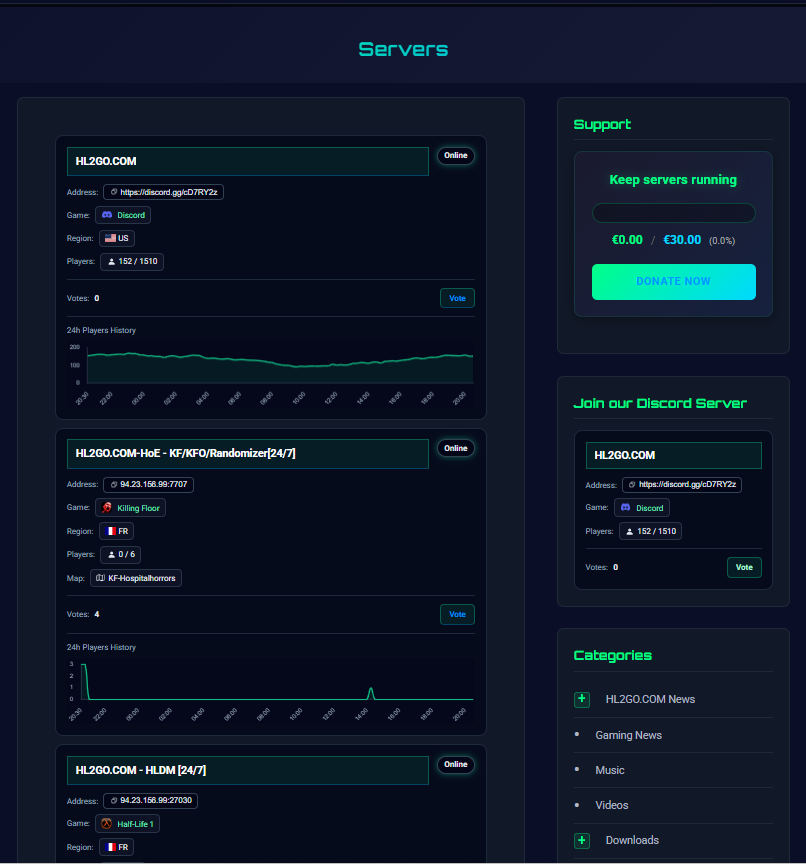
We’re excited to announce the release of List2Play Servers, a powerful WordPress plugin that enables you to live monitor and display game servers and Discord communities directly on your WordPress site with real-time player counts, server status, and interactive charts.
✨ Key Features
- 🔴 Real-Time Monitoring – Live server status and player counts
- 📊 Interactive Charts – 24-hour activity visualization
- 🎯 Multiple Display Methods – Shortcode, Widget, Gutenberg Block
- 💬 Discord Support – Special features for Discord communities
- 🔍 Advanced Filtering – Filter by game type, country, status
- 📱 Responsive Design – Works on all devices
- ⚡ Performance Optimized – Built-in caching system
- 🔒 GDPR Compliant – Privacy-focused
What Makes It Special?
Real-Time Server Monitoring: The plugin automatically detects whether servers are online or offline, displays current player counts for game servers and user counts for Discord communities, and updates this information automatically. Your website visitors always have access to the most current server information.
Interactive Activity Charts: Visualize server activity with beautiful Chart.js charts that display player and user count history over the past 24 hours. These charts help visitors understand server activity patterns and peak times.
Discord Community Support: Special support for Discord communities with “Join Link” display, user counts instead of players, and clickable join links. Perfect for Discord community managers.
Perfect For
Showcase your servers and keep community informed
Display Discord communities with real-time metrics
Help customers find the right server
Display featured servers in your content

📥 Download Now
List2Play Servers is free and available now in the WordPress Plugin Directory.
Supports 50+ game types: CS:GO, CS2, Minecraft, Rust, TF2, Discord, and more
Quick Setup
- Install from WordPress Plugin Directory
- Activate through WordPress admin
- Enter your API token from List2Play
- Select servers to display
- Add to pages using shortcode, widget, or block
About List2Play: List2Play is a comprehensive platform for game server and Discord community management. The WordPress plugin extends these capabilities to WordPress websites. Learn more at List2Play.net.
Leave a Reply
You must be logged in to post a comment.